This guide is for both sides: the business that pays the invoice, and the supplier whose name is being used. It covers how these requests arrive, the checks to make, what Confirmation of Payee results mean, and the first hour if the money has already gone.
How the request arrives
Invoice fraud, payment redirection, business email compromise: the idea is the same. Someone who isn't your supplier gets you to pay what you owe your supplier into an account they control.
The National Cyber Security Centre (NCSC) describes it as a criminal getting into email accounts and then sending fake invoices or changing payment details to redirect payments. Its Own Your Online guidance says the way in is often a guessed or stolen password, or one collected by phishing. That gives two versions of the same email:
- From the supplier's real address. Someone has got into the supplier's mailbox. The email comes from the right address because it is the right address, and it may sit in a thread you've used for months.
- From a look alike address. One letter added or swapped, or a different ending. Own Your Online tells readers to check that the sender's address matches the one the business usually uses or the one on its website.
Kiwibank says some scammers read a business's emails for a couple of weeks to learn when large payments are due, then send a message saying the business has changed banks. So the request can arrive with the right invoice number, the right amount and a familiar tone, in the week you were going to pay.
The NCSC also warns that a supplier's email system can be compromised in a way that ends with its customers paying fraudulent invoices. Your own controls can be good and you can still be the one who pays the wrong account, because the weak point was someone else's mailbox.
What the reported losses show
The NCSC publishes the losses people and organisations report to it each quarter. It doesn't publish a separate figure for this fraud, but two recent quarters show its size.
| Period | Total direct loss reported to the NCSC | The category that includes email compromise |
|---|---|---|
| January to March 2025 | $7.8 million | Around $5 million from unauthorised money transfers or business email compromise. More than half of all reported losses that quarter were to businesses. |
| July to September 2025 | $12.4 million | $6.4 million in the category the NCSC calls unauthorised or falsified transfer of money. The NCSC said the rise came from a small number of large losses involving business email compromise. Organisations reported $6.9 million of the total. |
Losses like these are lumpy. In the September 2025 quarter, 56 reports of $10,000 or more made up 97% of everything reported. In the next two quarters organisations reported about $300,000 and then about $340,000 in total losses. The latest quarter published when we checked, April to June 2026, had $2.7 million reported in all.
Two cautions. These are only the losses someone chose to report to the NCSC, so the full figure could be higher. And the categories are the NCSC's, so not every dollar in "unauthorised or falsified transfer" is a redirected invoice payment. The useful reading is that a single redirected payment can be large enough to move the national total.
An example: one email, $18,400
This is an invented example. The businesses, names and email addresses are made up.
A Hamilton joinery business buys its timber from a supplier we'll call Kererū Ridge Timber. It pays by bank transfer on each invoice. Invoice 2207 for $18,400 is due on 20 December. Two days before that, this arrives:
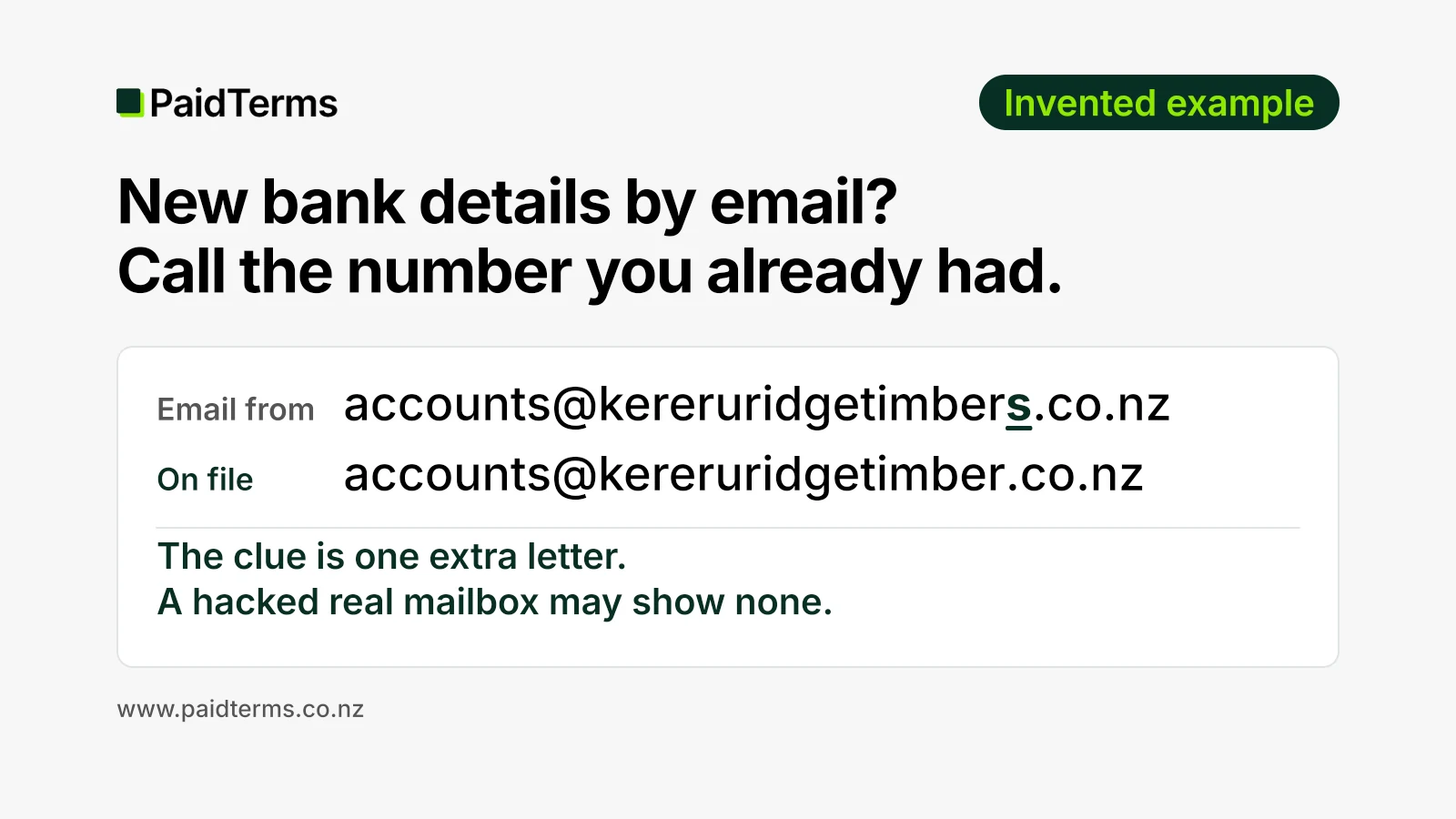
- From: Kererū Ridge Timber, accounts@kereruridgetimbers.co.nz
- Subject: New bank account, invoice 2207
- Message: "Hi, we've changed banks. Please pay invoice 2207 for $18,400 to our new account ending 9086. It needs to go today, or your order will be held. I'm in meetings all day, so just reply here."
| In the email | Why it matters |
|---|---|
| The sender address | It reads accounts@kereruridgetimbers.co.nz. The address on file is accounts@kereruridgetimber.co.nz. One added letter is easy to miss on a phone. |
| A new account for a supplier you already pay | Own Your Online treats any request to change bank account numbers as a red flag. Businesses do change banks, so it's a reason to check, not proof. |
| "It needs to go today, or your order will be held" | Pressure to act now. The NCSC's March 2026 alert asked businesses to be vigilant with emails containing links, particularly if they're unexpected or ask them to do something urgently, and to confirm by phone. |
| "Just reply here" | Our reading: if the phone call is the check, an email that steers you away from calling is steering you away from the check. |
Now change one thing. Suppose the criminal is inside the supplier's real mailbox. The address is the genuine one, the thread is the one you've always used, and the first warning sign has gone. The other three may or may not be there. That's why the protection can't be "spot the fake". It has to be a check that works even when the email looks perfect.
The checks before you pay
Do these every time a supplier's bank details change, however the request arrives and whoever it seems to come from.
| Step | What to do | Why |
|---|---|---|
| 1. Don't reply and don't click | Leave the email alone until you've checked it. | A reply goes to whoever sent it. Own Your Online says to verify through public contact details, not by replying. |
| 2. Call the supplier on a number you already had | Use the number in your records from before the request, or the one on the supplier's website. Not the number in the email, its signature or an attached invoice. | Kiwibank and Own Your Online both say to use a number you get independently, not the details on the invoice. |
| 3. Ask, don't tell | Ask the supplier whether it changed its bank details and to read the new account number to you. Don't read the number in the email to them. | Our suggestion. If you read it out, a hurried "yes, that's it" confirms nothing. |
| 4. A second person approves | Someone other than the person who received the email approves the new account before it's saved in your accounting software or banking. | Our step. It builds on Moore Markhams' advice to verify bank detail changes independently and to keep approving a payment separate from making it. One person acting alone on one email is the gap this fraud uses. |
| 5. Write it down | Note who you spoke to, the number you called and the date, against the supplier's record. | So the next person can see the change was checked, and how. |
| 6. Pay using the name from your records | Type the supplier's account name as you have it, not as the email gives it, and read the Confirmation of Payee result if your bank shows one (see below). | The payee check compares the name you type with the account. A name copied from the email only checks the email against itself. |
| 7. Confirm it arrived | Send a remittance advice and ask the supplier, on its usual number, to confirm the money landed. | If it didn't arrive, you want to know while your bank can still act. Kiwibank's advice on a scam payment is to move quickly. See what a remittance advice is. |
If you can't reach the supplier before the due date, pay once you've confirmed, even if that's a few days late, and tell the supplier why. Paying the confirmed account late is a better outcome than paying the wrong account on time. For the timing, our guide on how many days to take to pay suppliers can help. If a supplier has put your account on hold over a missed payment, see what account on stop means.
On small test payments: some businesses send a small amount to a new account first. We haven't made it a step. If the person who confirms the test arrived is the fraudster, the test proves only that the fraudster's account works. The phone call to a number you already had does the real work.
What Confirmation of Payee does, and what it doesn't
The standard check on a New Zealand bank transfer only confirms that an account number is valid. Payments NZ says that check can't tell whether the account is open or the name of the account holder. Confirmation of Payee adds a name check: when you pay a new payee online, your bank compares the name you typed with the name on the account at the receiving bank.
The New Zealand Banking Association (NZBA) said in October 2024 that banks would start a phased roll out by the end of November 2024, and listed 13 participating banks, including ANZ, ASB, BNZ, Kiwibank and Westpac. In April 2025 it said the roll out had recently been completed.
The results are named slightly differently by each bank. This is how they read:
| Result | What the banks say it means | What it can't tell you |
|---|---|---|
| Match | The name you typed matches the name on the account. | That the account is your supplier's. If you typed a name from the email, a match only shows the criminal gave you the right name for their own account. Kiwibank says to still make sure you know and trust the payee. |
| Partial match | Close but not exact, for example a typo or a shortened name. ANZ says initials and nicknames won't return a match. | Whether it's a harmless trading name or a near miss. Call the supplier before paying. |
| No match | The name and number don't match. ASB says to check the details or stop the payment. | Nothing reassuring. Kiwibank warns the money might not be recoverable and to be especially wary if someone asks you to ignore the result. An email that explains a mismatch in advance ("the account is in our parent company's name") is a reason to call. |
| Can't check | The receiving bank doesn't offer the check, or it's unavailable right now. | Anything at all about the account. Treat it as if there were no check. |
Its limits matter as much as its results:
- Saved payees. ANZ and ASB say payees you already have saved aren't checked. Kiwibank checks a saved payee only if you edit its details, and BNZ says its check runs when you set up or edit a payee. If a request asks you to change an existing supplier's account, ask your bank whether that edit is checked. ASB says a saved payee is checked only if you delete it and set it up again.
- Some business channels. The Code of Banking Practice commits banks to offering the check to consumers in retail mobile and web banking, so business platforms may not have it. ANZ says the check isn't available in ANZ Direct Online, and ASB's page says it isn't available yet in FastNet Business. None of the bank pages we read said whether payments uploaded as a batch file from accounting software are checked. If that's how you pay suppliers, ask your bank.
- It never blocks a payment. ANZ says you can go ahead whatever the result, and BNZ says it won't stop you paying. The decision stays with you.
- New Zealand accounts only. Payments to overseas accounts aren't checked, and ANZ and Kiwibank say registered bill payees such as councils and utilities aren't either.
- It isn't a scam filter. The NZBA said when it announced the service that it will not fully protect customers from scams.
The banks have also tied the check to how they handle scam losses. In April 2025 the NZBA said banks would compensate all or part of the loss for eligible customers in some authorised payment scams, where a bank missed one of its commitments. That went into an updated Code of Banking Practice from 30 November 2025. In its own example of partial compensation, the customer was held partly responsible for paying after a no match. Among other conditions, the Code itself says a customer is eligible only if they were a consumer, as defined in the Consumer Guarantees Act, when using the bank's services. They must also have reported the scam to Police and the bank within three months of finding it. It also says a bank will compensate only three times, up to $500,000 in total, over the banking relationship, and beyond that each bank uses its discretion. Ask your bank whether any of that covers your business account.
If you've already paid: the first hour
Speed matters. Kiwibank's advice is to move quickly, and Own Your Online says to contact your bank immediately because it may be able to recover the money.
- Call your bank's fraud or scam line now. Use the number on your bank's website or your card, not one from any email. In April 2025 the NZBA said banks had committed to a 24/7 reporting channel for customers who think they've been scammed, and to sharing scammer account details with other banks and freezing funds where appropriate. Kiwibank's line, for example, is 0800 113 355.
- Stop anything else going to that account. Check scheduled payments and the next payment run for the same account number. Police advice to scam victims includes not making any more payments.
- Tell the real supplier, on the number you already had. It needs to know its name is being used, and its other customers may be getting the same email.
- Report it. To the NCSC at ncsc.govt.nz/report, which can also alert the business being impersonated. To Police on 105. business.govt.nz also points businesses to the NCSC.
- Keep everything. Don't delete the emails. Note the times, the amount, the account number and who you've spoken to. Your bank, the NCSC and Police may ask for them.
- Check your own mailbox. If there's any chance your account was involved, Own Your Online says to change the passwords on affected accounts immediately, set up two factor authentication and tell your IT provider.
Whether you still owe the supplier, and who carries a loss like this, depends on the facts and isn't something this guide can answer. Your bank and a lawyer can.
If you're the supplier
It isn't only the customer's problem. Own Your Online says businesses that are impersonated can lose money owed to them and suffer reputational harm. If a customer pays a criminal, your invoice is still unpaid in your ledger, and you're now in an awkward conversation with a customer who thinks they've paid you.
What you can do:
- Tell customers how you change bank details, before anyone else does. Put a line on invoices, statements and your email signature, for example: "We will never change our bank details by email alone. If you get a request that looks like it's from us, call us on the number on our website." That's our wording, so adjust it to fit.
- Put your exact account name on your invoices. ASB advises businesses to give customers their full business account name and number. If your invoice shows a trading name and your account is in the company's legal name, your customers may see a partial or no match, and may get used to paying past it.
- Protect the mailbox. Own Your Online's business guidance is to set up two factor authentication. It also says to have your IT provider check auto forwarding rules, especially those relating to accounts receivable, and any filtering rules you didn't set up. A hidden rule can send customers' replies to someone else.
- If your mailbox has been compromised, warn customers that day. Change the passwords, set up two factor authentication, tell your IT provider and report it to the NCSC. Then call the customers with payments due first. In March 2026 the NCSC asked professional service providers to raise a spike in email compromise with their clients; the same instinct applies to anyone who invoices.
- When a customer says they've paid and you can't see it, ask which account. Treat it as urgent, not as a late payment, until you know where the money went.
Own Your Online also suggests considering eInvoicing, which sends invoices between accounting systems instead of by email.
Make it part of the payment run
The checks above are easier to keep when bills are paid in a batch on a fixed day, with one person approving and another releasing the money. If your run is a bank file uploaded from accounting software, the payee name check may not run on it, so the phone call and the second approval carry the whole load. Our guide to what a payment run is sets that up, and its checklist already includes confirming changed bank details by phone. The accounts payable guide covers the rest of the process, and if you're setting up the roles, accounts payable versus accounts receivable explains who looks after which side.
A separate scam targets suppliers: fake remittance advice emails that try to get an accounts team to open a link. That one is covered in our remittance advice guide.
Frequently Asked Questions
Is a supplier changing its bank account always a scam?
No. Businesses do change banks. Treat any change as unconfirmed until you've called the supplier on a number you already had, had a second person approve it, and recorded the call. A genuine supplier loses nothing by the call, and the call doesn't depend on spotting anything wrong in the email.
Does Confirmation of Payee stop invoice fraud?
Not on its own. It checks that the name you type matches the name on the account, and it never blocks a payment. If you type the name the criminal gave you, it can return a match on the criminal's account. Some payments aren't checked at all, including saved payees at some banks and some business banking channels. Use it alongside the phone call, not instead of it.
What does a partial match mean on Confirmation of Payee?
It means the name you typed is close to the name on the account but not the same, for example a typo, initials or a shortened name. It can be harmless, such as a trading name, but you can't tell which from the result. Check you've typed the name exactly as it appears in your records, then call the supplier on a number you already had before paying.
Should I call the phone number on the email or invoice?
No. If the email or invoice has been tampered with, the phone number on it may be the criminal's too. Kiwibank and Own Your Online both say to use a number you get independently, such as the one in your own records or on the supplier's website.
Who do I report invoice fraud to in New Zealand?
Your bank first, straight away, because it may be able to recover the money. Then the National Cyber Security Centre at ncsc.govt.nz/report, which can also alert the business being impersonated, and Police on 105. Tell the real supplier too, using a number you already had.
Can the bank get the money back?
Sometimes. Own Your Online says your bank may be able to recover the money, and banks have said they share scammer account details and freeze funds where appropriate. Nobody can promise it, and the chance is better the sooner your bank knows. Whether you get any compensation is a question for your bank.
News, insights and developments shaping New Zealand’s wholesale industry.
Sources
- National Cyber Security Centre, Quarter Three Cyber Security Insights 2025, July to September 2025, and the NCSC media release of 18 December 2025.
- National Cyber Security Centre, Quarter One Cyber Security Insights 2025, January to March 2025, and Own Your Online, Millions lost by businesses to cybercriminals, 16 June 2025.
- National Cyber Security Centre, quarterly reports for October to December 2025, January to March 2026 and April to June 2026.
- National Cyber Security Centre, Cyber Threat Report 2025, Judgement 4.
- Own Your Online, Business email compromise, Protect your business against email compromise, Protect yourself from invoice scams and More businesses hit by email account compromises, 2 March 2026.
- New Zealand Banking Association, Code of Banking Practice, in force from 30 November 2025.
- New Zealand Banking Association, Banks to start rolling out Confirmation of Payee in November, 9 October 2024, and Banks step up customer scam protections and compensation, 23 April 2025.
- Confirmation of Payee pages from ANZ, ASB, BNZ and Kiwibank, read 16 November 2026, and BNZ's announcement of 10 October 2024.
- Kiwibank, Altered invoice scams.
- Payments NZ, Online banking.
- business.govt.nz, Avoiding scams and fraud.
- New Zealand Police, Get a second opinion before handing over any money, 17 November 2023.
- Moore Markhams, Forensic accounting spotlight: rising invoice and impersonation scams, 21 January 2026.
This is general information, not legal advice. If money has gone to the wrong account, your bank and a lawyer can tell you where you stand.

Offer instalments
Offer your customers 3, 6 or 9 month plans, while getting paid up front.
Pay with instalments
Spread any NZ supplier invoice over 3, 6 or 9 months, while your supplier is paid up front.